
One field for everything about your money
Tell it anything about your money. It files it for you.
Type it, say it in Darija, snap the receipt or paste your bank's SMS. A coffee, a bill that comes back every month, money you lent, a goal, your monthly plan: Biaa Tracker understands it and fills it in. No bank connection, no spreadsheets.
- Voice in Darija
- Receipt photo
- Bank SMS
- Ask AI
- 1 field
- Spending · Bills · Debts · Goals · Plan
- 3 languages
- Arabic · French · English, and Darija understood
App preview
See Biaa Tracker in action
The field that takes anything, your month under it, and where every dinar went.
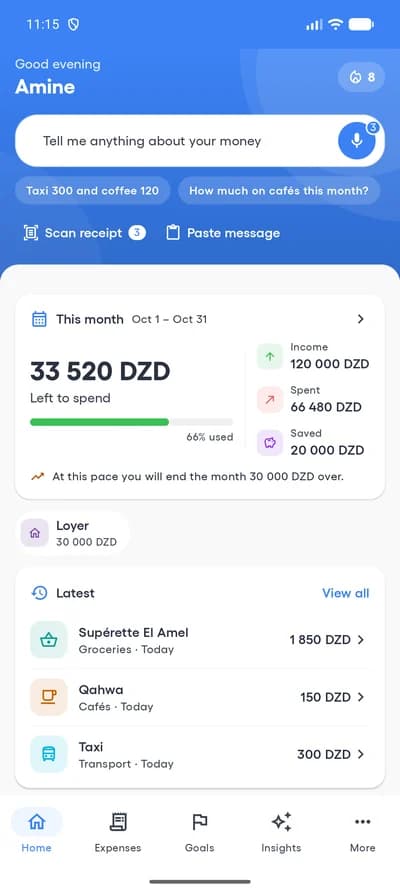
Home 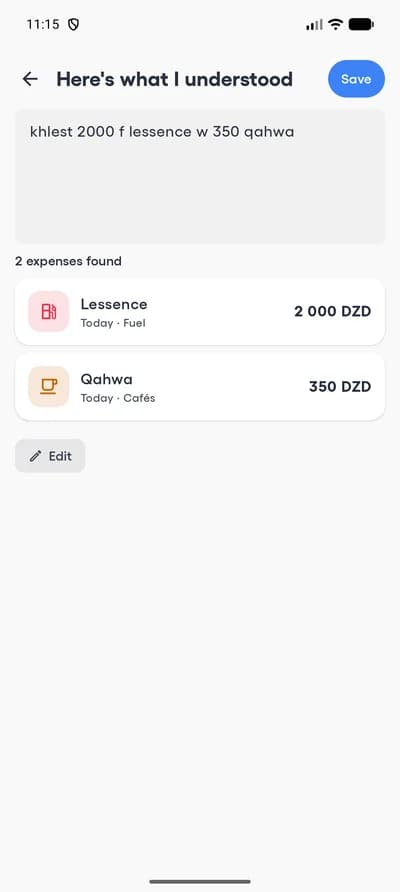
Read from one line 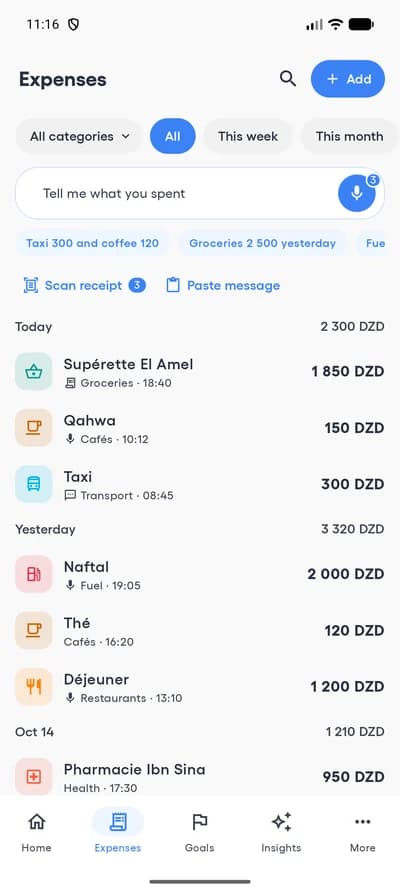
Expenses 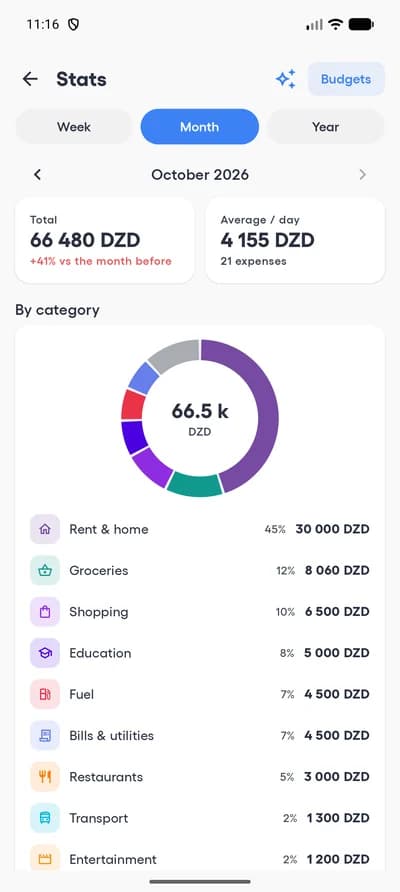
Statistics 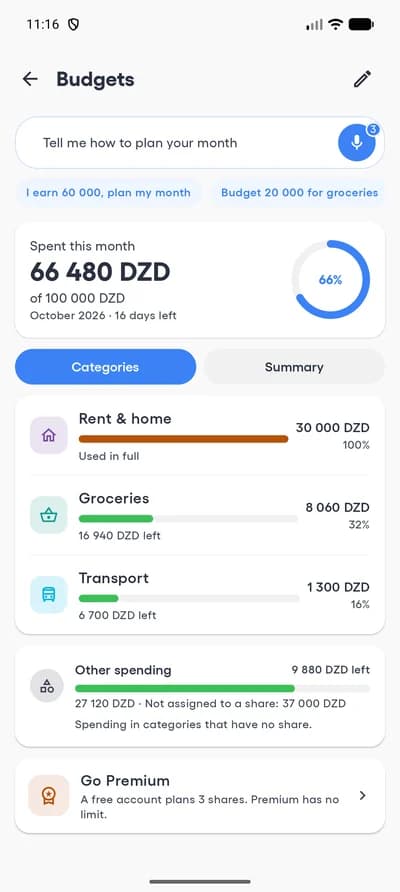
Monthly plan
The problem
Most expense apps are not built for cash
They expect a bank feed to fill them in. When you pay in cash, nothing arrives.
They ask you to connect a bank account, and cash never shows up in it.
Typing every coffee and taxi by hand is tedious, so tracking stops after a week.
They do not understand Darija, or a sentence that mixes Arabic and French.
Prices are in foreign currency, and only an international card can pay.
The Biaa Tracker solution
Say what you spent the way you would tell a friend, or photograph the receipt. Each expense is filled in for you: amount, category, shop and date. You check it, then it is saved. Premium is paid in dinars, with EDAHABIA or CIB.
About
What is Biaa Tracker?
Biaa Tracker is a personal money app for people who pay mostly in cash. Tell it what happened, in your own words, and it becomes an expense, a payment that comes back, a debt, money received or a goal. Then it shows where the month is going, against the plan you made for it.
- Tell it anything
- Plan your month
- Bills and debts
- Goals and challenges
Made for how you talk
It understands the way people really speak
Darija, Arabic, French and English, in the same sentence if you like. These are the kinds of words it files in the right category, even offline.
Fuel
- lessence
- mazout
- essence
- بنزين
Cafés
- qahwa
- قهوة
- café
- thé
Groceries
- khobz
- hlib
- courses
- خضرة
Transport
- taxi
- bus
- tram
- طاكسي
Bills
- trisiti
- facture
- الماء
- internet
Health
- pharmacie
- dwa
- طبيب
- médecin
Recognition is not perfect. You always see the result, and can correct it, before anything is saved.
Logging an expense
Type it, say it or snap it. Then ask.
Typing is free and unlimited. Voice, receipts and questions come with free uses every day, and no limit with Premium.
- Free
Type it
The AI field
Write it the way you would say it. Simple lines are read on the spot, even with no signal, and never use a free use. Paste your bank's SMS the same way.
taxi 300 and coffee 120
- Simple lines read free, even offline
- Several expenses in one line
- Bank and BaridiMob SMS pasted in
- Free uses daily
Say it
Voice
Tap the mic and talk the way you normally do. “Netflix 1200 every month” becomes a recurring payment, “I lent Karim 5000” a debt.
“khlest 2000 f lessence w 350 qahwa”
- Darija, Arabic, French, English
- Expenses, bills, debts, goals
- Up to 30 seconds
- Free uses daily
Snap it
Receipt photo
Photograph the receipt. The total, the shop, the date and each line are read for you.
Total · Shop · Date · Lines
- Unclear values are flagged to check
- Line items listed
- From the camera or your gallery
- Free uses daily
Ask it
Ask AI
Ask a question about your spending and get the figure, with the dates it covers.
“How much did I spend on cafés this month?”
- Answers from your own expenses only
- Shows the figures it used
- Not financial advice
You stay in control: nothing is saved until you have seen it. Every amount, category and date can be corrected first.
How it works
Start in 3 simple steps
Getting started takes less than a minute.
- 01
Pick your language and currency
French, Arabic or English, and dinars or another currency. Sign in with a code: no password.
- 02
Tell it, say it or snap it
An expense, a bill, a debt or a goal in a few seconds, whichever way suits the moment.
- 03
See where it goes
Totals by day, week and category, budgets that warn you, and answers to your questions.
Who is this for
Who is Biaa Tracker for?
Anyone who wants to know where the money went, without a bank feed doing it for them.
People who pay in cash
Nothing to connect. If you can say it, you can track it.
Households
See what goes on groceries, bills and school each month.
Students
Keep a small budget under control, one coffee at a time.
Freelancers and shopkeepers
Keep an eye on daily spending without opening a spreadsheet.
Savers
Plan the month, put money aside for a goal, and see it grow.
Darija speakers
Talk the way you normally do. No need to switch to formal Arabic or French.
People who pay in dinars
Local prices, paid with EDAHABIA or CIB.
Privacy-minded people
No bank connection, the app locked with your PIN or your face, and recordings and photos deleted after 30 days.
Features
Everything about your money, in one place
A plan for the month, what comes back, what is owed, what you are saving for, and how it all went.
A plan for the month
Your income, what you keep aside, and a share for rent, food and the rest. See what is left every day.
Payments that come back
Rent, internet, subscriptions: entered once, recorded each month, with a reminder the evening before.
Who owes whom
Money lent and borrowed, with each repayment, until it is settled.
Savings goals
A car, the Omra, a wedding: what to put aside each month to get there on time, and a nudge weeks before Ramadan, the Eids and back to school.
Challenges and streaks
A week without cafés, a daily limit, days with nothing spent. Short enough to finish.
In review
Your week and your month in one screen: what went where, and what stood out. Share it if you like.
Works offline
Add expenses with no signal; a simple line is even filed in its category. Everything syncs later.
Widgets and export
Your month on the home screen, and PDF or CSV exports with Premium.
Locked to you
Your PIN, your fingerprint or Face ID opens the app, and your figures stay hidden in the app switcher.
Plans
Free vs Premium
Free to start: unlimited manual entry and history, with free uses of voice, receipts and Ask AI every day. Go Premium for no limits.
| Feature | Free | Premium |
|---|---|---|
| Manual entry and history | Yes | Yes |
| Simple lines read instantly, even offline | Yes | Yes |
| Statistics, In review, challenges | Yes | Yes |
| Recurring payments and debts | Yes | Yes |
| Voice logging | Free uses daily | Unlimited |
| Receipt scanning | Free uses daily | Unlimited |
| Ask AI | Free uses daily | Unlimited |
| Monthly plan | 3 shares | Unlimited shares |
| Savings goals | 1 goal | Unlimited |
| PDF and CSV export | No | Yes |
Pricing
Choose your plan
Knowing where your money goes should cost less than a coffee. Start free, then pick the plan that suits you.
Free
For getting started
0 DZD
- Unlimited manual entry and history
- Free voice notes, receipt scans and AI questions every day
- A monthly plan with 3 shares, and 1 savings goal
- Statistics, In review and challenges
Monthly · Yearly
Prices are loading. Please try again in a moment.
Prices include taxes where applicable. A web payment does not renew automatically. Subscriptions bought in the App Store or Google Play are managed in the store.
Payment
Simple, secure payment
Pay with your Algerian bank card. Premium is activated automatically, seconds after the payment is confirmed.
- EDAHABIAAlgérie Poste card
- CIBInterbank card (Algerian banks)
- 1
Choose your plan
Monthly or yearly, from your account page.
- 2
Pay securely
You are sent to Chargily Pay, an Algerian online payment service.
- 3
Premium, straight away
Once the payment is confirmed your account is upgraded, in the app too.
- Secure payment
- Instant activation
- No automatic renewal
Payments by Chargily Pay. EDAHABIA and CIB accepted.
Subscribe online
Already have an account? Pay from your browser
Open your account, sign in with the same email or phone number as in the app, and pick a plan. Premium appears in the app straight away.
Why Biaa Tracker
Made for the way people pay in Algeria
For people who want a clear picture of their spending, in their own languages and at local prices.
- No bank connection needed
- Arabic, French and English, and it understands Darija
- Works without a signal
- Prices in dinars, paid locally
- Recordings and photos deleted after 30 days
- On iPhone and Android
Answers describe your recorded spending. They are not financial advice.
FAQ
Frequently asked questions
What people ask before they start tracking with Biaa Tracker.
What is Biaa Tracker?
A personal expense tracker for people who pay mostly in cash. You log what you spend by voice, receipt photo or typing, and it shows where your money goes.
Do I need to connect my bank account?
No. Nothing is connected. You tell the app what you spent.
Which languages does it speak?
The app is in Arabic, French and English. When you talk or type to it, it also understands Algerian Darija, including sentences that mix languages.
Is the AI always right?
No. It can mishear an amount or pick the wrong category. That is why you see every result before it is saved and can correct any field. Values it was unsure about are marked for you to check.
Is Biaa Tracker free?
Yes. Manual entry, categories, history and statistics are free and unlimited. Voice notes, receipt scans and AI questions have free uses every day.
Can I try it without an account?
Yes. Tap “Try it without an account”: you can type expenses, plan your month and set a goal. Create a free account to back everything up and to use voice, receipts and Ask AI; what you entered comes with you.
What happens when I run out of free uses?
They reset every day at midnight. You can keep typing expenses without limit, or go Premium for unlimited use.
What does Premium add?
Unlimited voice logging, receipt scanning and AI questions, budgets per category, and PDF and CSV export.
Can I pay with EDAHABIA or CIB?
Yes, on this website: open your account, sign in and choose a plan. Premium appears in the app straight away.
Does it work without an internet connection?
Yes. Everything you enter is kept on the phone and syncs when you are back online. A simple line like “taxi 300” is even read and filed offline. Voice, receipts, pasted messages and Ask AI need a connection.
What do you do with my recordings and photos?
They are sent to our servers to be read, then deleted automatically after 30 days. Only the extracted expense is kept. They are never sold or used for advertising.
Can I lock the app?
Yes. In Settings, App lock: choose a 4-digit PIN, and unlock with your fingerprint or Face ID if your phone has them. It locks as soon as you leave, or after a minute or five, and your figures are hidden in the app switcher. Forgot the PIN? Sign out and sign in again with a code: your expenses are kept in your account.
How do I delete my account?
In the app under Settings → Delete my account, or from your account page on this website. Everything is erased.
Start knowing where your money goes, today.
Download Biaa Tracker and log your first expense in under a minute.
Need help? Support